This post may contain affiliate links. If you buy through them, we may earn a commission at no extra cost to you.
Last updated / verified: 2026-04-25
Short answer: Pick by required ports first, then use the live listing to verify HDMI, PD charging, Ethernet speed, and laptop fit before checkout. Start with the Quick Picks table; use the full notes only to rule out bad fits.
Fast shipping or lower price?
Choose the buying route before comparing picks
For electronics, batteries, hubs, cables, and creator gear, Amazon can be the safer fast-return option while AliExpress can still be useful for cheaper variants. Check both before you buy.
Quick answer
If you want the strongest all-round budget option in this batch, the 8-in-1 Ethernet + SD hub is the best overall pick because the title gives one of the clearest low-cost port stories here.
If you want a smaller everyday carry hub, the Vention compact 5-in-1 hub is the cleaner compact option. If price matters more than anything else, the Basic 5-in-1 Ethernet hub is the cheapest workable pick in this final five.
Decision shortcut: If you need Ethernet plus card slots, start with the first 8-in-1 pick; if you want the smallest travel hub, compare the Vention and UGREEN options before chasing the cheapest listing.
Quick Picks: best budget USB-C hubs first
| Role | Pick | Why shortlist it | Watch out | CTA |
|---|---|---|---|---|
| Best overall | 8-in-1 Ethernet + SD hub | Best first stop if you need Ethernet, SD/TF, PD, HDMI, and USB-A in one cheap hub. | This is a listing-based recommendation, not a hands-on-tested one. | Check price |
| Best compact hub | Vention compact 5-in-1 hub… | Compact option when you only need HDMI, USB-A, and PD pass-through. | The title does not promise Ethernet or a card reader. | Check price |
| Best 8-port value | 8-in-1 Ethernet value hub… | Another budget 8-in-1 route if the top pick is unavailable or overpriced. | The title is less specific than the top-ranked 8-in-1 listing. | Check price |
| Best MacBook side hub | UGREEN 6-in-2 side hub | Cleaner side-hub style for compatible dual-USB-C MacBook layouts. | This is a specialized shape, not a universal pick. | Check price |
| Cheapest workable | Basic 5-in-1 Ethernet hub… | Lowest-friction cheap pick if you can accept slower Ethernet and 4K30. | 100Mbps LAN is a clear downgrade from gigabit listings. | Check price |
Fast buying decision: Choose by the port problem, not by the longest AliExpress title. Start with Best overall for desk-plus-travel use, Best compact hub for a smaller bag, or Best MacBook side hub only if your laptop has the matching dual-USB-C layout.
Want the safer/faster route? Compare the Amazon version of this guide for faster shipping, easier returns, and more predictable buying.
Fast Amazon option for USB-C hubs
Need faster delivery or easier returns? Use Amazon as a fast-shipping comparison starting point, then compare the same basics: HDMI refresh-rate claims, USB-C PD passthrough wording, Ethernet speed, card-reader support, and laptop compatibility.
- Check the current price, seller, shipping date, and return terms on the live Amazon page.
- Confirm the exact model, wattage, size, or compatibility matches this guide before checkout.
- Some Amazon links may earn TrendRank a commission as an Amazon Associate.
Amazon results are not necessarily the same AliExpress listings shown below.
Top 5 budget USB-C hubs on AliExpress
1) 8-in-1 Ethernet + SD hub
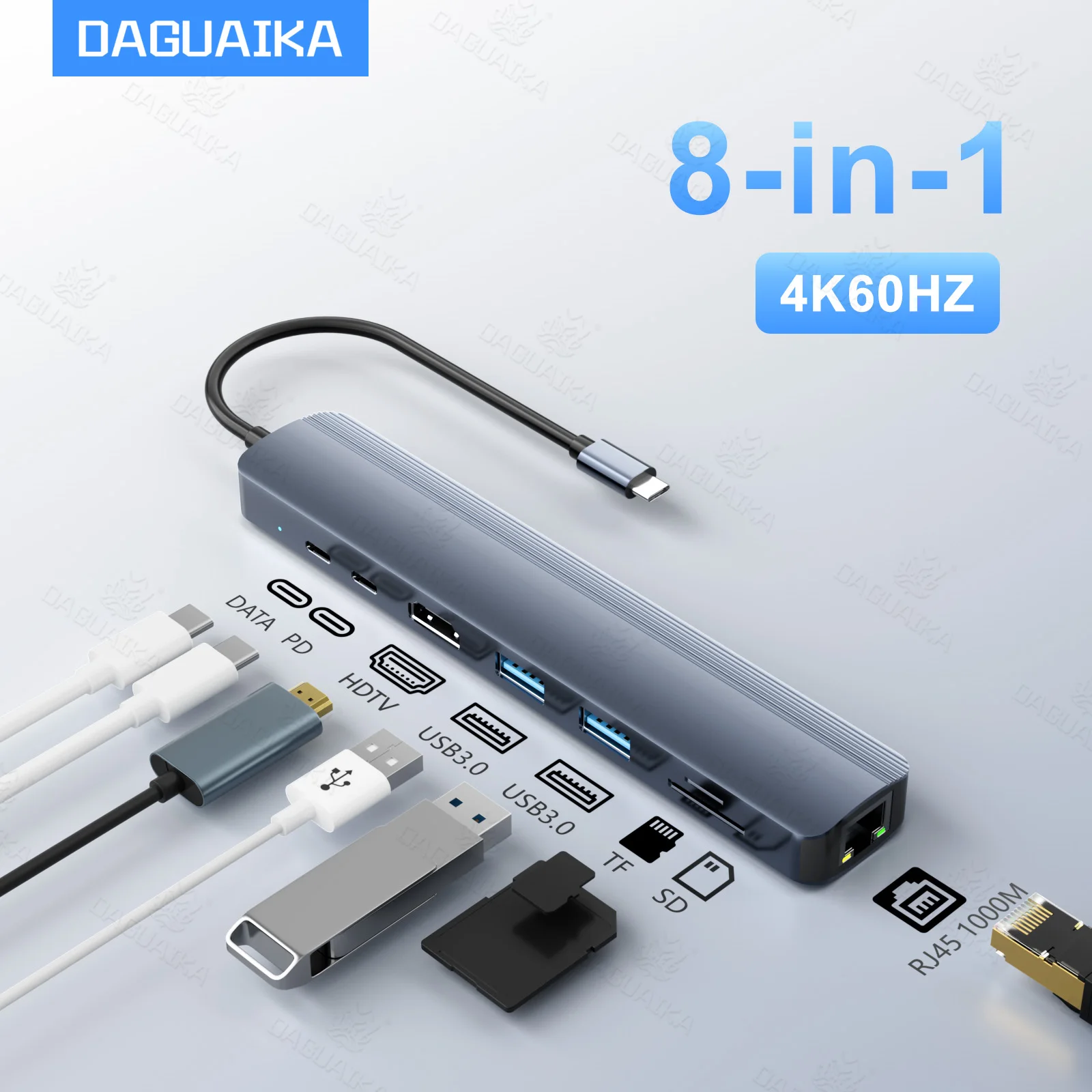
Role: Best overall
Best for: Laptop users who want the clearest low-cost mix of display, Ethernet, card-reader, and everyday USB expansion signals in one listing.
Why pick this:
This listing earns the top spot because the title says more than most low-cost hub listings do. It explicitly calls out 4K60Hz, 1000M Ethernet, PD100W, SD/TF card slots, and three USB 3.0 data ports.
That does not prove all of those claims will behave perfectly on every setup, but it does make this listing easier to compare responsibly than many bargain-bin alternatives. For a budget roundup, that kind of title clarity matters.
Watch-outs
- This is a listing-based recommendation, not a hands-on-tested one.
- Real display output and passthrough charging behavior should still be verified against your own laptop and charger.
- If you only need a few ports, a simpler hub may offer better value.
Price snapshot: $19.72 at sourcing time
CTA:
- Price snapshot: Typical AliExpress price range to expect: budget / mid-range / higher-priced option; the current price can vary by region, selected variant, coupons, seller, and shipping.
- Confirm the selected variant matches the image, bundle, and size you actually want.
- Check for a Choice or fast-shipping badge, free returns where available, recent buyer photos, visible sold count, and reviews beyond seller images.
- Verify shipping, coupons, compatibility, and return terms on the live AliExpress page.
2) Vention compact 5-in-1 hub

Role: Best compact hub
Best for: Laptop users who want a simpler carry-friendly hub and do not need every extra port category.
Why pick this:
The appeal here is straightforward: 5-in-1, 4K 60Hz HDMI, USB 3.0, and PD 100W wording from a more compact-looking listing. That makes it easier to recommend to people who want to keep their desk or travel kit simple.
Compared with the fuller 8-in-1 hubs above and below it, this one feels less like a mini dock and more like an everyday basic expansion option.
Watch-outs
- The title does not promise Ethernet or a card reader.
- Compatibility wording spans several device types, so buyers should still confirm their own laptop setup.
- Listing-level power and display claims should stay in that conservative frame.
Price snapshot: $18.28 at sourcing time
CTA:
- Price snapshot: Typical AliExpress price range to expect: budget / mid-range / higher-priced option; the current price can vary by region, selected variant, coupons, seller, and shipping.
- Confirm the selected variant matches the image, bundle, and size you actually want.
- Check for a Choice or fast-shipping badge, free returns where available, recent buyer photos, visible sold count, and reviews beyond seller images.
- Verify shipping, coupons, compatibility, and return terms on the live AliExpress page.
3) 8-in-1 Ethernet value hub

Role: Best 8-port value
Best for: Budget shoppers who want an 8-in-1-style listing below the twenty-dollar mark and care more about broad utility than polished branding.
Why pick this:
This pick makes the final five because the title still gives a usable budget story: 8-in-1 positioning, Ethernet, PD 100W wording, USB 3.0, and laptop/tablet framing at a sourcing-time price that stays very competitive.
It ranks below the top pick because the title is a little less explicit about the full port story, but the price-to-feature angle is still strong enough to justify inclusion.
Watch-outs
- The title is less specific than the top-ranked 8-in-1 listing.
- Buyers should check the listing photos carefully for the exact port layout they need.
- Do not assume every MacBook mention means universal fit across all laptops.
Price snapshot: $18.76 at sourcing time
CTA:
- Price snapshot: Typical AliExpress price range to expect: budget / mid-range / higher-priced option; the current price can vary by region, selected variant, coupons, seller, and shipping.
- Confirm the selected variant matches the image, bundle, and size you actually want.
- Check for a Choice or fast-shipping badge, free returns where available, recent buyer photos, visible sold count, and reviews beyond seller images.
- Verify shipping, coupons, compatibility, and return terms on the live AliExpress page.
4) UGREEN 6-in-2 MacBook side hub
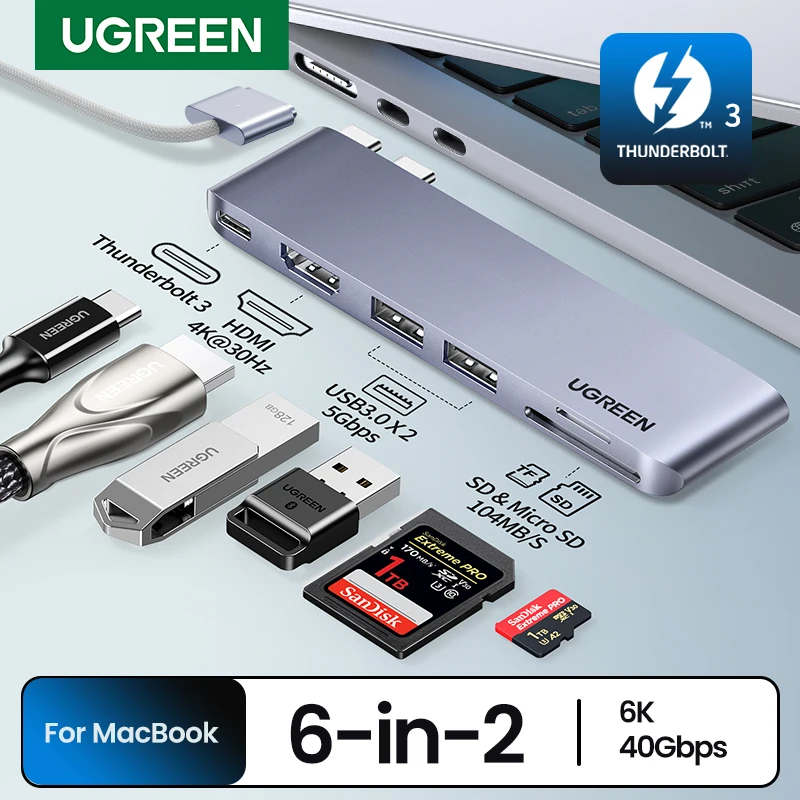
Role: Best MacBook side hub
Best for: Buyers with a compatible dual-USB-C MacBook layout who want a side-mount style instead of a dangling cable hub.
Why pick this:
Most budget hub roundups are dominated by cable-style adapters. This one gives a different angle, with a 6-in-2 layout plus 4K HDMI, USB 3.0, and SD/TF wording in the title.
It is not the best fit for every reader, but it earns a slot because it serves a distinct use case without jumping out of the budget range used in this roundup.
Watch-outs
- This is a specialized shape, not a universal pick.
- Buyers should verify physical compatibility before ordering.
- The MacBook-specific design makes it less flexible than a standard cable hub.
Price snapshot: $22.55 at sourcing time
CTA:
- Price snapshot: Typical AliExpress price range to expect: budget / mid-range / higher-priced option; the current price can vary by region, selected variant, coupons, seller, and shipping.
- Confirm the selected variant matches the image, bundle, and size you actually want.
- Check for a Choice or fast-shipping badge, free returns where available, recent buyer photos, visible sold count, and reviews beyond seller images.
- Verify shipping, coupons, compatibility, and return terms on the live AliExpress page.
5) Basic 5-in-1 Ethernet hub
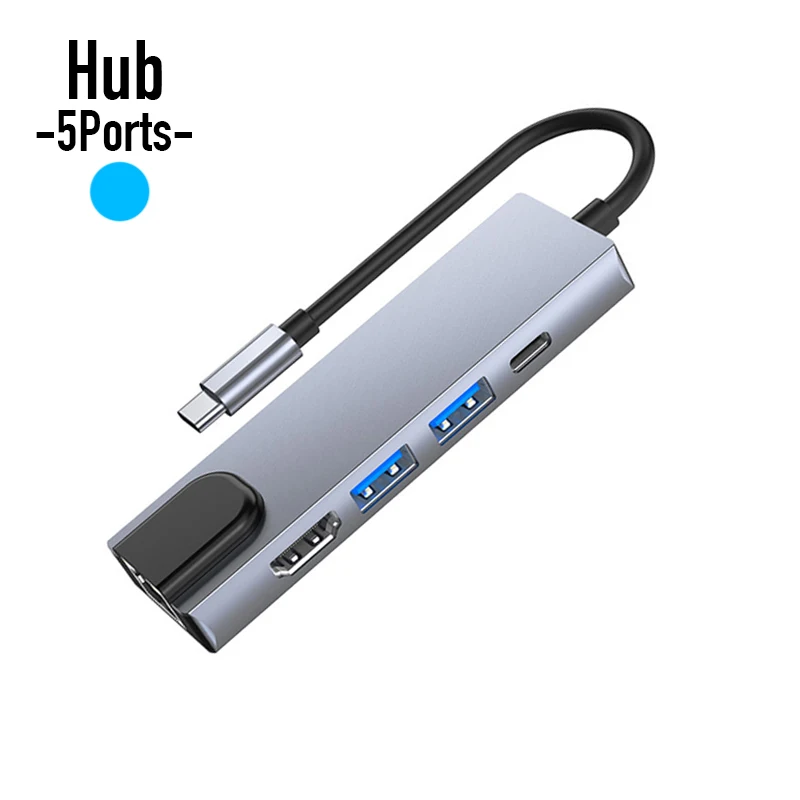
Role: Cheapest workable
Best for: Shoppers whose first priority is paying as little as possible while still getting a basic LAN-plus-HDMI-style hub listing.
Why pick this:
This listing stays in the roundup because the price is dramatically lower than the other finalists while still naming 100Mbps RJ45 LAN, USB 3.0, USB 2.0, PD charge support, and 4K 30Hz HDTV output in the title.
That makes it a fair ultra-budget option for readers who know they are buying down on performance expectations and just want the cheapest plausible starting point.
Watch-outs
- 100Mbps LAN is a clear downgrade from gigabit listings.
- 4K 30Hz is a more limited display claim than 4K 60Hz listings above.
- This is the kind of pick where checking exact expectations matters most.
Price snapshot: $4.36 at sourcing time
CTA:
- Price snapshot: Typical AliExpress price range to expect: budget / mid-range / higher-priced option; the current price can vary by region, selected variant, coupons, seller, and shipping.
- Confirm the selected variant matches the image, bundle, and size you actually want.
- Check for a Choice or fast-shipping badge, free returns where available, recent buyer photos, visible sold count, and reviews beyond seller images.
- Verify shipping, coupons, compatibility, and return terms on the live AliExpress page.
Don’t overthink it
For most readers, the best budget USB-C hub on AliExpress in this batch is the 8-in-1 Ethernet + SD hub because it balances price, title clarity, and useful everyday expansion signals better than the rest.
If you want something simpler, the Vention compact 5-in-1 hub Adapter for MacBook Dell iPhone iPad Android is the cleaner compact alternative. If your budget is extremely tight, the Basic 5-in-1 Ethernet hub Extender Dock for Macbook Air Pro is the cheap fallback, as long as you accept the obvious tradeoffs.
What to avoid before you click
- Buying a hub only because the title says a big wattage number
- Assuming every 8-in-1 listing exposes the same actual port mix
- Ignoring whether you need gigabit Ethernet or just basic wired connectivity
- Choosing a MacBook-specific form factor for a laptop that does not physically fit it
- Treating marketplace claims like lab-tested guarantees
How we picked these budget USB-C hubs
We filtered for AliExpress listings that were still useful for normal laptop expansion on a budget.
The shortlist favored listings that did at least most of the following:
- clearly named core ports or functions in the title
- exposed enough detail to explain tradeoffs honestly
- stayed in a budget-friendly price range at sourcing time
- had a visible product image and direct marketplace purchase path
- looked relevant for laptop users instead of niche docking scenarios
We did not assume headline claims automatically equal verified performance. Unknowns stay unknown.
Why budget USB-C hubs are easy to get wrong
A cheap USB-C hub can feel like an easy win until you realize the listing title does not clearly tell you what kind of shortcut you are buying. Some hubs look inexpensive because they are genuinely simple. Others look inexpensive because key details are vague.
For budget-conscious laptop users, that matters. A low headline price is only useful if the listing still gives you enough clarity on ports, display claims, charging passthrough language, and basic use-case fit. This roundup stays AliExpress-first so the recommendation, price snapshot, image, and affiliate CTA all point to the same listing.
These picks are based on listing wording and sourcing-time signals, not hands-on testing. If a listing says 4K 60Hz, PD 100W, gigabit Ethernet, or SD/TF support, we treat that as a listing claim rather than a guaranteed real-world result on every laptop.
Buyer’s guide: how to choose a budget USB-C hub without overspending
1) Pay for the ports you will actually use
If you only need HDMI and a couple of USB ports, a compact 5-in-1 hub can make more sense than a fuller 8-in-1 model.
2) Keep Ethernet speed in perspective
Not every LAN port is the same. A 100Mbps listing can still be useful, but it is not the same kind of buy as a listing that clearly says 1000M Ethernet.
3) Treat PD wattage headlines conservatively
A title that says PD 100W can be a useful comparison signal, but it is still safer to treat it as listing language until you confirm the fine print for your setup.
4) Watch for specialized laptop fit
Some hubs are broad cable-style adapters. Others are clearly shaped for specific laptop layouts. A specialized design is only a bargain if it actually matches your machine.
5) Do not confuse a cheap listing with a complete listing
On AliExpress, a low price and a vague title often travel together. Budget buyers are usually better served by the clearest cheap listing, not simply the absolute lowest number on the page.
FAQ
Are budget USB-C hubs on AliExpress worth considering?
They can be, especially if your goal is simple laptop expansion without spending much. The key is choosing listings that say enough to compare responsibly.
What is the safest budget-friendly hub style for most people?
Usually a normal cable-style hub with a clear title is the safest starting point. It tends to be more flexible than a specialized side-mount design.
Is 4K 30Hz good enough on a cheap hub?
For basic desk use, it may be fine. But it is still a more limited claim than 4K 60Hz listings, so buyers who care about smoother external-display use may want to spend a little more.
Should I trust PD 100W in an AliExpress title?
Trust it as a listing-sourced comparison signal, not as a universal guarantee. Charger, cable, and laptop behavior still matter.
Why include a MacBook-specific pick in a general laptop roundup?
Because some budget shoppers are specifically using compatible MacBooks and want that side-mount layout. It is included as a niche fit, not as the default pick for everyone.